
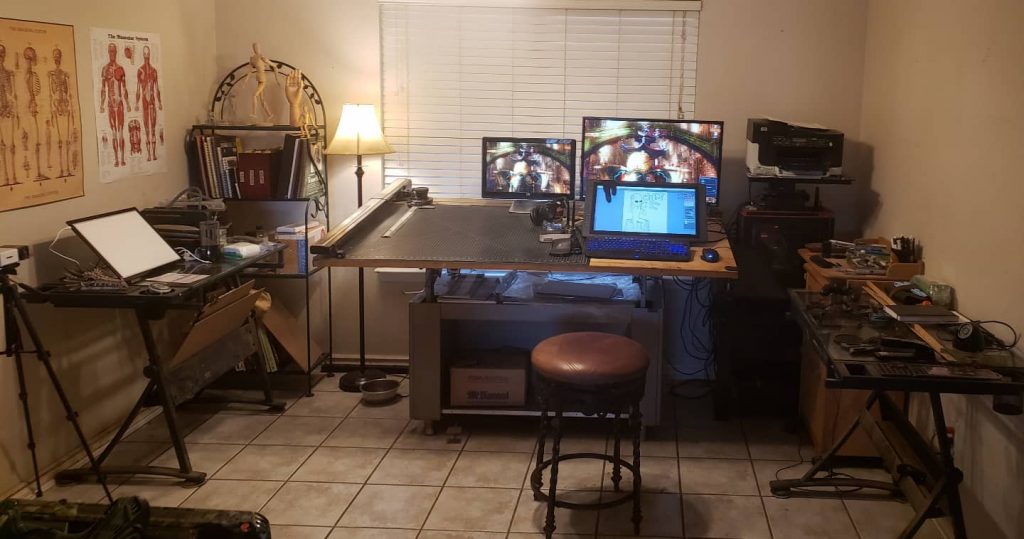
Welcome to my studio.
Over the years as a practicing artist, I have made it a ritual practice of always getting rid of things that I deem unnecessary. I guess I am a utilitarian of sorts. In truth, anyone who is a creative always has their tools that they deem necessary, but I can assure there is a closet with all the tools that we all used in years past. With the advent of drawing monitors, scanners, and amazing software, I transitioned from analog to digital and found it freeing in that it only costs electricity and labor. The analog way costs in the sense of art supplies, which can get expensive when you are trying to practice new methods. I will admit changing to digital was a challenge at first due to the learning curve involved with the software available.
My Studio
I personally use three monitors, one for reference pics, one for a second application such as posemyart, and the third monitor is my drawing monitor Huion Kamvas 22. I have the standard mouse and keyboard but I also use a Nostromo Keypad for hotkeys used in the graphic software. It is important that anything one chooses works well and its comfortable to use. This was the main consideration I had when choosing devices to use. It is of the utmost importance to me that I have little to no distractions when I am working. Distractions equal being pulled out of the flow-state while doing artwork. I find it hard to jump in and out of the flow-state, so being optimal in the workspace matters to me.
COMPUTER:
Instead of going into what the specifications are on my desktop I recommend finding a mid to high range gaming computer as they are designed to handle the graphic load that most art programs have.
DRAWING MONITOR:
I currently use a Huion KAMVAS 22 as my drawing monitor. I have found that its very dependable and the one I currently use is over ten years old. This in itself is a good selling point but when your pen quits working, third party pens for drawing monitors will work with it also.
KEYPAD:
The keypad I use is the Razer Nostromo keypad. These were used for gaming purposes but actually works well with any software. It allows for eight different sets of keyboard shortcuts. This allows the keypad to be programmed for eight different applications. This particular model isn’t available through retailers, but I have seen listings on ebay.
Software
I have used Adobe products among others but hands down Corel Painter allows for any media that you can imagine. This doesn’t have the bells and whistles that Clip Studio Paint has. CSP was designed for doing Manga style comics.
The biggest advise I could give anyone starting out in digital art is:
- Always get a computer that is capable of running the software you want.
- Always think in terms of how you can make your workflow easier so you can focus on the art.
- Remember it takes time to learn how to use all the tools and brushes, all the artist you see on youtube had to put time in to be able to execute their art style.
- Not so much advise as a way to be:
- Draw with passion
- Draw with purpose.
- Draw for fun
So whatever you decide to choose for yourself, the main thing is to enjoy yourself.
